Refurbished Tech Online: A Beginner's Guide to Buying Well
Buying refurbished tech is one of the better value moves in consumer electronics — if you know what to check first. Here's how to read condition grades, warranties and seller signals before you click buy.

6 min read

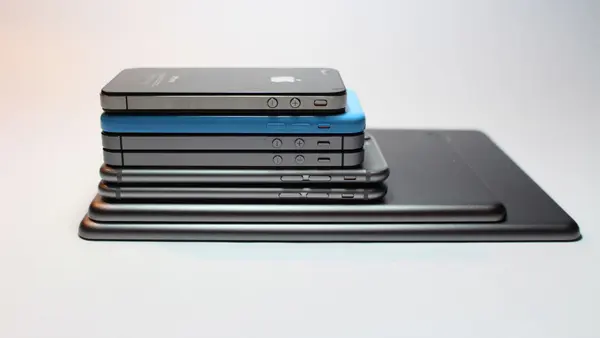
Photo: Adam Sondel / Pexels
What "refurbished" actually means
One word covers at least three different situations, and the difference matters more than the label.
- Manufacturer refurbished. The device went back to the original maker or an authorised repair partner. It was tested, repaired where needed, and repackaged. This is usually the most predictable option.
- Seller refurbished. A third party — sometimes a specialist, sometimes a warehouse with a bench and a screwdriver — has inspected and repaired it. Quality ranges from excellent to rough.
- Open box or customer return. Often barely used. Sometimes nothing was ever wrong with it; the original buyer simply changed their mind.
None of these are inherently bad. The problem is that sellers use the same vocabulary for very different levels of work, so you have to look past the word and read the detail.
The condition grades, decoded
Grades are not standardised. One retailer's "Grade A" is another's "Good", and a third's "Excellent". Treat the label as a starting point, not a specification.
What grades usually describe
Almost always cosmetics — scratches, scuffs, dents, screen marks. They rarely describe performance, because a device with a flawless shell can still have a tired battery.
Questions worth asking before you buy
- Does the listing show photos of the actual unit, or a stock image of a pristine device?
- Is the grade described in words ("light scratches on the back, screen unmarked") rather than a single letter?
- What's in the box — charger, cable, original packaging, nothing?
- Is the screen described separately from the body? Screen condition is what you'll actually notice.
If a listing won't tell you what the scratches look like, assume there are some.
Warranty: the line that matters most
A warranty is the single best indicator of how confident the seller is in their own work. Read it properly rather than skimming for the word.
- Who honours it? The seller, a third-party insurer, or the manufacturer. A warranty from a company that might not exist next year is worth less than one from an established provider.
- What's covered? Faults only, or wear items too? Batteries are the item most likely to fail first and the one most often excluded.
- How do you claim? A described process — a form, a repair centre, a collection arrangement — tells you the seller has done this before.
- Does it sit alongside your statutory rights? In the UK, Ireland and most US states, consumer law gives you protections regardless of what the seller offers. A warranty should add to those, not replace them.
If the warranty section is one vague sentence, that is your answer.
Who did the refurbishing?
Ask who actually did the work. A specialist repairer will usually describe their testing process: what they check, what they replace as standard, how they clean and reset devices. A reseller who simply buys pallets of returns and passes them on will describe none of this.
A useful signal is a stated data-wipe process. Any reputable seller should be able to tell you how previous data was erased, because a device that wasn't properly wiped is both a privacy risk and a sign of sloppy process elsewhere.
Battery health and wear items
For phones, laptops, tablets and earbuds, the battery is the component that decides whether the device feels new or feels old.
- Ask for a battery health reading or cycle count where the seller can provide one.
- On laptops, ask about the hinge, keyboard and fan — mechanical parts wear in ways photos won't show.
- On earbuds, battery degradation is often the whole story. A pair that lasts a fraction of its original runtime isn't a bargain at any price.
- On anything with a screen, ask whether there's any image retention, dead pixels or touch dead zones.
Seller signals: green flags and red flags
Green flags
- Grading explained in plain language, with photos of the actual unit
- A named warranty provider and a described claims process
- Battery health reported without you having to ask
- Reviews that discuss after-sales service, not just how fast the parcel arrived
- A returns process written in ordinary sentences
- A real company address and contact details
Red flags
- No grading detail beyond a single letter
- Warranty described only as "covered"
- Stock photos only, especially for used-grade items
- Reviews clustered around delivery speed and nothing else
- Urgency language designed to stop you comparing
- No mention of how data was erased
Pros and cons of buying refurbished
Pros
- You get the same function for meaningfully less outlay than new
- Higher-spec hardware becomes affordable within a fixed budget
- Keeps working devices in use instead of in landfill
- Older flagships often outperform cheaper new mid-range devices
Cons
- Quality varies enormously between sellers
- Software support may end sooner than on a new model
- Cosmetic condition is a lottery unless photos are provided
- Returns can be more fiddly than with a mainstream retailer
What to check the moment it arrives
Do this within the first hour, before you get attached to it.
- Match the serial number to the listing. A mismatch is an immediate return.
- Check the battery reading against whatever was advertised.
- Test the screen on a plain white and plain black background for marks and dead pixels.
- Exercise every port, the speakers, the microphone and the camera.
- Confirm there's no activation lock or leftover management profile from a previous owner.
- Run the software updates and check the device behaves normally afterwards.
- Keep the packaging until you're certain, in case you need to send it back.
If something's wrong, report it straight away. Most return windows are measured from delivery, and quiet waiting is the thing that costs buyers their options.
When refurbished is the wrong call
Refurbished is a strong default for phones, laptops, tablets, monitors and accessories. It's a weaker choice when:
- You need the newest model for a specific feature or long software support
- The device is safety-critical, such as medical or certain monitoring equipment
- You can't verify the seller at all, and the saving isn't worth the risk
- You need it working immediately with no tolerance for a return process
A quick buying checklist
- Read the grade description, not the grade letter
- Confirm who refurbished it and what they tested
- Find the warranty, the provider and the claims route
- Ask for battery health on anything battery-powered
- Check the seller's reviews mention after-sales, not just delivery
- Know your statutory rights before you buy
- Test thoroughly on day one and keep the packaging
Buying refurbished rewards patience more than bargain-hunting. The best deals aren't the cheapest listings — they're the ones where the seller tells you exactly what you're getting, and stands behind it when something goes wrong.